
Welcome! Have a look at the latest news about the projects I've been working on. Realistically, though, you may find more insight into what I'm up to on my Bit Stampede blog, which is where I do most of my blogging.
Updated Merlin Macros
Today I’ve updated my Merlin macro sets for both System 6.0 and 6.0.1 and for GS/OS. The updated Merlin System 6 Macros file corrects an error; the GetAuxWindInfo macro was not set up correctly and would result in crashing code. Many thanks to Andrew Roughan, both for pointing this error out to me and for being persistent about it when I kept forgetting to fix it. If you use these macros, you should definitely download the new version.
The GS/OS macros haven’t had any functional changes made. Both macro files have some comment corrections; in particular contact information has been updated — I hadn’t done so since my college days; my old University of California microcomputer lab account hasn’t worked since 1995! Beyond that, you don’t have to update these.
Sweet16 3.0.3 released
I've posted Sweet16 version 3.0.3 for download. The key changes in this release are a new About box—the first portion of Sweet16 to be rewritten as Cocoa code—and the following two key bug fixes:
- I fixed a memory leak in full-screen mode that would fairly quickly eat up a lot of free memory the longer you stayed in full-screen mode.
- The internal tools used to implement the ability to drag files in and out of the emulator were not built correctly to support Intel Core Duo processors. These are the earliest processors supported by Sweet16, and were not working with this feature. Now they are.
There are other changes, as well, so please review the release notes.
I'm particularly excited about the new About box. Between being much more beautiful and starting my journey to a new Cocoa version of Sweet16, there's a lot to celebrate here!
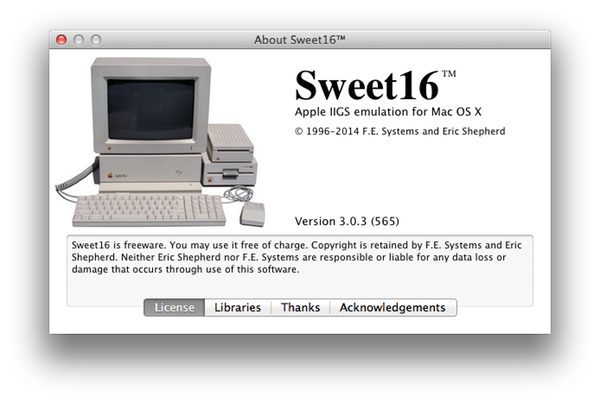
The text should now be crisper and sharper, and there's the added information, including license information for Sweet16 as well as the libraries it uses, thanks to my testers and others, and acknowledgements to others that need a hat-tip.
The things I learned converting this one simple window to use Cocoa will carry me forward as I work toward migrating more of the project. I hope to begin work on re-implementing the disks window as Cocoa soon, and more will follow.
I love working on this project, and I'm excited to see where I can take it in the future!
Updated info for AsmIIgs formats for MPW
I've updated the page for MPW AsmIIgs Formats with a link to a mirror of MPW, since Apple has removed it from their site. In addition, I've added some more information about specifically which files you need to download and a bit of information about the format of the image file you're downloading.
In addition, I've added information about Kelvin Sherlock's awesome mpw command for Mac OS X, which lets you run MPW commands directly from the Mac OS X terminal, instead of having to use a classic Mac or emulator to do so. This means you don't need my MPW editor plugin at all, of course, since you'd be using a Mac OS X native editor instead.
Hopefully that's helpful!
Crash-on-quit resolved by Sweet16 3.0.2
After a lot of debugging and head-scratching, I've finally tracked down the tricky little error that was causing that strange crash-on-quit in Sweet16. Version 3.0.2 is now available to correct the problem.
In addition, this update adds a "Clear all breakpoints" option to the debugger, as well as improved code signing to make Mac OS X just a little bit happier.
On the interior front, I've updated the project to build with Xcode 5, so I'm ready to continue work on the stuff I'd already been doing toward the next major update. Check out the release notes and/or download Sweet16 3.0.2 now!
Enjoy!
Sweet16 3.0.1 now available
I've released Sweet16 3.0.1. This minor update to Sweet16 fixes a handful of annoying bugs and adds a modest but useful new feature to the debugger. See the release notes for a complete list, but the highlights are:
- Fixed: Full-screen mode now works correctly on Macs with Retina displays.
- Fixed: arrow keys no longer "stick" down when using certain software that accesses the keyboard at a low level, such as Wolfenstein 3D.
- Fixed: bringing Sweet16 to the foreground by clicking on one of its windows now also focuses the clicked window.
- Fixed: shutdown-time alerts' buttons now respond correctly when Marinetti is installed.
- Added: The debugger now includes a "Break" button, which immediately puts the emulated system into single-stepping mode. This is especially useful for debugging infinite loops and other "hangs."
Sweet16 3.0 released
At KansasFest 2013 today, I released version 3.0 of the Sweet16 emulator for the Apple IIgs computer. This version has a number of improvements, but its primary new feature is support for drag-and-drop of files back and forth between the Apple IIgs (in desktop applications) and the Mac OS X Finder.
In addition, there's initial support for debugging Apple IIgs code running in Sweet16 from a Web browser.
For details, check out the Sweet16 page, read the user guide, or download and try out Sweet16 3.0!
OK-Writer 1.4 released
I've released OK-Writer 1.4! This is the latest version of my fairly successful word processor designed for kids. It's also popular with people with vision difficulties, thanks to its unique speech features.
This new version adds support for full-screen mode, improves the look-and-feel of the application by adding support for retina displays and improved layout of document window features. I've also replaced the steel grey background in the editor windows with a friendly periwinkle blue, added modernized user interface elements such as the integrated find bar (for more advanced kids), and other improvements.
It's worth noting that OK-Writer 1.4 requires at least Mac OS X 10.6, and as such no longer supports older PowerPC-based Macs, so you should stick with version 1.3 if you have one of those. However, it's now a universal 32-bit/64-bit Intel application.
SideClick version number note
I'd just like to point out that although the released version of SideClick 2.0 displays "2.0b2" in the Get Info window in the Finder, it's really the release version of SideClick 2.0. I just accidentally forgot to fix the version number before releasing it.
So don't panic!
SideClick 2.0 really posted
Turns out the archive I previously posted for SideClick 2.0 was a weird mish-mash of bits of SideClick 2.0 and SideClick 1.0; in fact, the extension itself was, unfortunately, SideClick 1.0. So if you've previously downloaded SideClick 2.0, you should try again to get the real thing. Sorry about that!
Trasher 1.0 released
I've released my first all-new project in years! Trasher is a new extension for the Apple IIgs that adds support for using Command-Delete on your keyboard to delete the selected icons in the Finder.
In addition, if you have SideClick installed, you get "Move to Trash" and "Empty Trash" contextual menu items as appropriate!
The funny story behind Trasher is that I actually started working on this project back in 1994, but was unable at that time to figure out a way to make it work. I finally had the grand epiphany this summer during KansasFest and spend the last few weeks working out the kinks and making it work.