
Current version: 3.0.3
Freeware
Requires Mac OS X 10.6.8 or later
Sweet16 is the most capable Apple IIgs emulator for computers running Mac OS X. Based on the BeOS version of Sweet16, which was in turn based on the outlandishly popular Bernie ][ The Rescue, its code is mature and positioned to have more and better features added over time. Apple IIgs fanatics and nostalgic '80s junkies alike will love Sweet16!
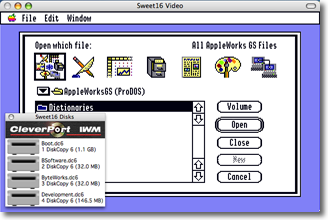
AppleWorks GS running in Sweet16.
Please feel free to visit my bug database to check out the status of known bugs or to file bug reports of your own! Note that you may need to accept a private security certificate.
-
Sound and Music
Sweet16 fully emulates the Ensoniq 5503 Digital Oscillator Chip that powers the Apple IIgs sound system. Play games and music with full-quality sound, including full stereo support.
Drag-and-Drop Files Between GS and Mac
With the addition of an optional extension on your Apple IIgs, you can easily transfer files back and forth between the Apple IIgs and the Mac by drag and drop.Print from Desktop Applications
Desktop applications that use the Apple IIgs Print Manager can print using a custom LaserWriter driver (included). Printed output appears in the Mac OS X Preview application, from which you can save the output in PDF format or print it to any Mac-compatible printer.Disk Image Management
Create disk images right from within Sweet16. You can also eject, mount, lock, and unlock disk images using a simple user interface. Easily access recently-used disk images.Use Your Favorite Software
Sweet16 should run almost anything you throw at it. Certain copy-protected games won't work correctly, but there are very, very few that won't.Total Control
Pause and resume the emulator. Keep an eye on your Apple IIgs's progress even while the emulator window is minimized into the Dock. Control the Apple IIgs's system speed, with ZipGS™ accelerator emulation included. Or just let the emulated IIgs run at full speed. Your choice!Debug
Sweet16 uses modern Web technologies and a built-in server to let you debug Apple IIgs code using a modern Web browser (Firefox 22, Chrome 27, or Safari 6 on desktop and laptop computers; also compatible with Firefox 22 on Android as well as the iOS 6 version of Safari). The debugger is a bit of a work in progress; expect improvements soon!Screen Capture
Copy the contents of the text screen to the Mac OS X pasteboard, or grab the screen as a graphic screenshot to paste into your favorite graphics program.Emupacks
Create Emupacks -- self-contained Apple IIgs systems, complete with ROM, disk images, BRAM settings, and preferences—and start them up by simply double-clicking them in the Mac Finder. Use the included Mac OS X service to open multiple Emupacks at once, letting you run multiple Apple IIgs systems at once.Clipboard Sharing
You can transfer text between the Mac and Apple IIgs clipboards.Joystick Support
The Apple IIgs can use some Mac joysticks and gamepads. -
Q: Where do I get system disk images?
A: You can download them for free from Syndicomm's web site. You can also download Ewen Wannop's custom boot disk image: the free Sweet16 Starter Kit. This is specifically preconfigured for use with Sweet16, and has some starter software installed as well. There are options in Sweet16's Help menu to get to all of these and more.Q: When I drag files to my GS from the Mac, I'm getting a dialog box telling me the disk is an unrecognized type. How do I fix this?
A: The file transfer by drag-and-drop feature uses an HFS-formatted disk image to copy the files to the GS. If you don't have the HFS FST installed, it won't work. Use the Apple IIgs System 6.0.1 install disks to add this to your IIgs and restart it. Everything should work correctly once that's done.
Q: The screen is a total mess on my retina MacBook Pro. What's up?
A: This is a known bug in Sweet16 3.0. This was fixed in Sweet16 3.0.1.Q: The arrow keys keep getting stuck. What do I do?
A: This bug was in Sweet16 2.3.x and Sweet16 3.0. It's fixed in Sweet16 3.0.1.Q: The keyboard in Sweet16 acts really strangely, with keys getting stuck or ignored sometimes. What's going on with that?
A: This almost certainly means that your emulated Apple IIgs has the "Easy Access" extension installed. Look in the System/System.Setup folder of your IIgs startup disk image and disable or delete this extension, then restart the emulated Apple IIgs.Q: I can't get FTP or Silver Platter (Web serving) to work.
A: Sweet16 doesn't support "listening" for incoming networking connections. For FTP, you need to use passive mode. Unfortunately, you can't use Silver Platter on the current version of Sweet16.Q: How come I can't connect to the built-in debugger?
A: The debugger is inactive by default; go into the Other panel in the emulator's preference and turn it on. Also, be sure your Mac doesn't have a firewall configured to block its connections.Q: How does the debugger deal with security issues?
A: Currently, it doesn't. If you have concerns about keeping your Apple IIgs secure, don't enable the debugger server, or use a firewall that's configured to only allow your own computers to connect to your Mac.
Q: I'm trying to mount a CD-ROM in Sweet16 2.0 or later and it's not working.
A: There are a couple of possible reasons for this. First, Sweet16 only supports mounting off the first CD drive it finds. If you have multiple CD drives, try using a different one. In addition, you need to make sure the media on the CD-ROM is supported by the Apple IIgs. Install the HS.FST (for ISO 9660 support) and HFS FST (for Mac HFS support) from the System 6.0.1 disks.Q: I'm using the Sweet16 2.0 or later and would like to resize the video window. How do I do it?
A: Hold down the Option key on your keyboard. You should see the little resize box appear in the lower-right corner of the video window. Click on that and drag the window size until it's the size you want. Once it's the size you want, release the mouse button and the Option key. Note that due to the way IIgs graphics are drawn, the display can have some interesting artifacts when it's at certain sizes. You can also use the View menu's options to select specific sizes. Also, Mac OS X 10.8 has some quirks with this functionality and the window does not resize well.Q: Sweet16 won't mount disk images that worked fine in Bernie/KeGS/insert emulator name here. What gives?
A: Make sure the image file has the correct extension at the end of the filename. Bernie didn't require extensions; it used the classic Mac OS filetype and creator type codes to identify image files. Unfortunately, that method doesn't work well on Mac OS X, so Sweet16 requires extensions. Some images that worked fine on Bernie may also have the wrong extension on them. When in doubt, check to be sure the right extension is on the file. I personally discovered when first working on Sweet16 that my hard disk images, which I thought were in Universal Disk Image format (and had .2mg extensions) were actually raw images, and needed the extension changed to .raw in order to work correctly.
Sweet16 2.0 does a much better job of automatically identifying disk image formats.
Q: When I choose "Restart" from the Setup menu, my Mac tries to reboot. What's going on?
A: This is a conflict with Unsanity's Application Enhancer. Configure Application Enhancer to ignore Sweet16.Q: Sweet16 keeps getting my keystrokes wrong. Why?
A: Make sure you configure your emulated Apple IIgs with the appropriate keyboard layout using its Control Panel; it doesn't automatically inherit the layout configured on the Mac.
Q: When I try to initialize 800K disk images, I get I/O errors. How can I do this?
A: This is a long-standing glitch in the IWM emulation that dates all the way back to Bernie ][ The Rescue. You can work around it by mounting the 800K disk image on the CleverPort (by holding down the option key while mounting it). Then you can initialize it there. -
Version 3.0.3 (April 6, 2014)
Note: None of the Apple IIgs extensions or desk accessories changed for this release, so you don't need to update them.
- All-new About box, rewritten in Cocoa, with additional features including license information, hexadecimal build number for added nerdiness, and more.
- Fixed bug in About box that could cause a crash if the build number couldn’t be retrieved for some reason.
- Updated the code that draws the note in full-screen mode about how to get out of full screen mode to stop allocating new texture buffers 30x/sec without ever deallocating them. It only needed to do this once in the first place, and this bug was causing a massive leak of memory while in full-screen mode. Fixes bug 158.
- Rebuilt the internal utilities that are bundled into the Sweet16 application that are used by the file drag-and-drop support; these were previously compiled to require a full 64-bit processor, and therefore would not work on an Intel Core Duo CPU (which is the oldest CPU on which Sweet16 can still be used).
- Updated a macro that auto-generates a lot of the emulation code to eliminate huge numbers of code warnings and in theory some possible run-time errors (although to be clear, no known problems were fixed by this).
Version 3.0.2 (November 26, 2013)
Note: None of the Apple IIgs extensions or desk accessories changed for this release, so you don't need to update them.
- Fixed the bug that was causing crashes on quit, finally. Took a long time to find this one; it was a sneaky devil!
- Made assorted bits of memory management code a little bit more robust.
- The disk eject sound effect works again.
- Added a “Clear All Breakpoints” button to the debugger.
- Cleaned up some memory management code.
- The integrated utility programs are now code-signed as required by Xcode 5.
- Code signing of the application itself with my developer ID is now done more correctly.
Version 3.0.1 (August 12, 2013)
Note: Don't forget to install the updated versions of the SweetDupe and SweetPrinter extensions if you use any of the platform integration functionality! See the user guide for details.
- Rearranged the order in which certain tasks are performed on shutdown to reduce the chances of hitting a Mac OS X bug that’s causing crashes when freeing memory used for tracking certain disk image files.
- Updated the code that adds the Quit option to the “It is now safe to shut off your Apple IIgs” alert to not break if Marinetti presents its “You’re shutting down with an active network connection” alert as well.
- Minor adjustments to the OpenGL startup code that may slightly improve performance on certain hardware.
- Rewrote the code that switches between full screen and windowed modes to use newer CGDisplay APIs. Full screen mode now works correctly on Macs with Retina displays.
- Fixed broken handling of modifier keys when being interpreted through low-level ADB access, such as in Wolfenstein 3D. Previously, key-up events were not being correctly generated for these keys.
- Added support to Sweet16 for a new “start” type for the “step” command. This is used by the included debugger to immediately break into the debugger when you click the new “Break” button.
- The debugger API “setRegisters” command now supports all the same registers “getRegisters” does, although this functionality is not yet used by the debugger itself. That should come soon!
- The Sweet16 build number is now displayed in the emulator info alert presented by the debugger, in parentheses after the version number. This value is also in a new “build” value reported by the debugger API’s “getEmulatorInfo” command.
- Console output is now only time-stamped at the beginning of new lines; you can no longer wind up with timestamps in mid-line if you don’t include a newline each time you send console output.
- Removed a JavaScript library from the debugger that I’m no longer planning to use.
- Sweet16 3.0.1 is now code-signed with my Apple Developer ID.
- When activating Sweet16 with a mouse click, the window clicked on is now correctly made the frontmost window, instead of just bringing the application to the foreground.
Version 3.0 (July 24, 2013)
Note: The drag-and-drop of files requires installing the new SweetDupe extension on the IIgs. Please read the user guide before using Sweet16 3.0!
- Sweet16 3.0 requires Mac OS X 10.6.8 or later, and as such is no longer compatible with PowerPC Macs.
- Implemented support for dragging files from the Mac into the GS Finder and vice versa; requires both the SweetPrinter and SweetDupe extensions to be installed on the emulated IIgs.
- Implemented the first phases of the new Sweet16 debugger protocol, which is provided by a built-in WebSocket server that responds to special JSON-format commands, and sends its responses in JSON format as well. See “The Sweet16 Debugger” for details.
- There’s also a Web server internally, that’s running when the debugger server is running, which serves up the built-in Debugger for you to use in your browser.
- The internal Web server can also send a PNG image of the current Apple IIgs screen if you ask it for a file called currentscreen.png; for example, to load it from a browser running on the same computer as Sweet16, visit http://localhost:6502/currentscreen.png.
- Created the new “Open In New Sweet16 Instance” service.
- Removed the old JavaScript-based scriptable debugger and the user interface for controlling and configuring it.
- The mounted disks window’s context menu now offers a “Reveal in Finder” option.
- Fixed a bug in the IWM code that could result in failure to correctly count the tracks on a 5.25” disk.
- Changed all references to “CleverPort” to “SmartPort” because... well... it was confusing people.
- Renamed the “Automatically pause when in Dock” preference to “Automatically pause when minimized.”
- Added an option to the Setup menu to let you select a ROM file. Finally!
- When the screen dims while the emulator is paused, it no longer fades all the way to black.
- Alert boxes are now presented using a thread-safe method that will reduce the potential for crashes being caused by trying to present an alert from threads that don’t have access to the user interface layer.
- Added an option to the Help menu to download Ewen Wannop’s “Sweet16 Starter Kit”.
- Updated many of the special internal COP intercepts to set the carry flag correctly on errors.
- Cleaned up a lot of compiler warnings; these were harmless but sloppy.
- A little clean-up work on the ADB emulation code.
- Showing and hiding of the Mac cursor is much more reliable as you mouse in and out of Sweet16.
- The click that activates Sweet16 after it’s been in the background is no longer passed along to the IIgs. This should help reduce the number of accidental clicks on buttons and the like on the IIgs.
- Mouse events handled by the emulator are no longer reported back to the Mac as “unhandled.”
- Significantly improved the Mac event handling code to be more efficient and less... quirky.
- Implemented support for detecting the COP codes inserted when ORCA compilers are configured to output code for ORCA/Debugger. Currently, this just results in some extra console output, but soon this will be used more by the Sweet16 Debugger.
- Console logging from IIgs code (done using a special COP operand) is now directed to the debugger instead of to the Mac’s console.
- The about box now shows a build ID number next to the version number.
- The about box no longer wastefully requests two references to the application bundle.
- Updated all places that were using hard-coded buffer sizes for pathnames to use the PATH_MAX constant, so that they at least are guaranteed to be big enough.
Version 2.3.1 (July 31, 2011)
Note: The improvements to mouse wheel support rely on an updated version of the SweetPrinter extension; please install that if you want to use the mouse wheel features.
- Improved the vertical mouse wheel support to be more reliable.
- Added support for horizontal mouse wheel scrolling.
- The emulator speed overlay now moves properly when the video window is resized.
Version 2.3 (July 22, 2011)
Note: Many of these features rely on updated versions of Apple IIgs components; be sure to install them from the embedded tools disk that you can mount using the option in the Setup menu.
- Sweet16 now provides nice support for mouse wheels for vertical scrolling in desktop applicaitons.
- Sweet16 now sets the appropriate I/O bits to differentiate between left and right clicks of the mouse (bug 121).
- Fixed a crash that was occurring when trying to play disk eject sound effects.
- Clearing of memory on reset is now more like on a real Apple IIgs (bug 104).
- Fixed the "Clear Recent Disks" menu option so it no longer crashes (bug 105).
- Replaced the broken "Get Clipboard from Mac" NDA on the embedded tools disk with an updated version that works (bug 120).
- Rewrote the code to support the mouse wheel. Now instead of sending up and down arrow key events, it actually scrolls the contents of windows, TextEdit boxes, and other scrollable objects.
- Rewrote all the sound code; now it uses Core Audio instead of the old and very obsolete Sound Manager (bug 101).
- In order to make code that uses sound interrupts for timing work better, Sweet16 now fires two sound interrupts per oscillator they finish playing in one-shot mode, instead of just one. This makes the interrupts fire closer to the right timing (although still not correct). This helps games like Tass Times in Tonetown have music that sounds closer to the way they do on a real IIgs. I'm still trying to sort out the real cause of this problem (bug 111).
- Changed the "Sound Support" option into a "Mute Sound" option. This no longer disables the sound code (which broke a lot of GS software), but instead simply sets the volume to zero (bug 125).
- Improved the reliability of the 1-bit sound emulation code by removing the code that shuts off the sound engine while idle. This reduces sitations where the beginning of sounds was clipped off. This was supposed to improve performance (and might have way back on slower processors), but wasn't.
- Also removed special code that shut off 1-bit sound processing while idle, for the same reason.
- Removed the system information window, which only displayed emulated CPU speed. Instead, find an option in the View menu to show an overlay on the GS video window that tells you the emulated speed.
- While in full screen mode, there's now a text notice in the GS screen border area explaining how to get back to windowed mode. This is typically only visible if you don't use the "native aspect ratio" mode.
- If you install the SweetPrinter extension on your emulated IIgs, the shutdown dialog box in desktop applications now offers a "Quit" button that quits Sweet16, as well as the normal "Restart" button. You can just press "Q" to quit.
- Pausing the emulator now dims the screen to make it obvious that you're paused (bug 102).
- Cleaned up the about box to be a little nicer looking.
- The preference window includes a note explaining that you need to quit and restart Sweet16 for changes to the ZipGS enable/disable preference to take effect.
- Changed the default title of the video window.
Version 2.2.1 (September 16, 2010)
- The CleverPort ROM now correctly stores $C7 in $07F8 when handling I/O.
Version 2.2 (July 18, 2010)
- Sweet16 now defaults to having speed control enabled, with the GS set to a 40 MHz emulated speed. This prevents laptops from getting hot while running Sweet
- You can easily turn off speed control to let your GS fly, using the preferences' CPU options panel.
- You can now mount ProDOS-order (.po) disk images that are not floppy disk sizes.
- When paused, Sweet16 no longer continues to use lots of your Mac's processor capacity.
- Creating 1.4 MB disks using the Create Disk Image feature now creates disk images that are actually 1.4 MB, rather than 1.6 MB.
Version 2.1.3 (August 29, 2009)
- Adjusted the CPU emulation loop, resunting in a substantial emulated IIgs speed increase, especially on PowerPC.
- Fixed the CPU speed control feature to work on PowerPC.
- Rewrote the Recent Disks menu code to only show the names of the disk image files, instead of full URLs, in the Recent Disks submenu.
- The Control-H keystroke no longer resets the emulated Apple IIgs. Oops.
- Removed some stray debug output.
Version 2.1.2 (August 26, 2009)
- Fixed several errors in the French keyboard support.
- Creating any size disk image, including floppy disk sizes, now has the same speed improvement that hard disk image creation received in Sweet16 2.1.1.
- Removed an obsolete error message.
- Fixed an error message that was coming up blank when trying to create an invalidly-sized DiskCopy 4.2 image.
- The disk image size now tracks correctly in the "Create Disk Image" window, so the size you get actually matches the size you picked all the time; there were cases in which that wouldn't necessarily be the case.
Version 2.1.1 (August 4, 2009)
- Reworded the alert that appears when trying to mount a CD-ROM when no CD-ROM is found, since the same alert is used both when there is no CD-ROM media available as well as when there is no CD-ROM drive available.
- Memory no longer gets leaked when controls in the Create Disk Image and Create Emupack file panels are clicked on.
- The Create Disk Image panel now lets you create DiskCopy 4.2 images at 1.4 MB.
- The Create Disk Image panel's size popup no longer wanders out of view when you resize the panel.
- Enabled some new optimizations that noticeably improves performance on PowerPC systems.
- Removed some unnecessary debug output.
- The SpiderMonkey JavaScript runtime is now weak-linked, so that Sweet16 really does now run on PowerPC G3 systems (albeit without debugger support).
- The Create Disk Image panel now lets you choose a disk image format on Mac OS X 10.4; previously this popup window didn't do anything prior to Mac OS X 10.5.
- Creating disk images of even 1 MB sizes (5 MB, 10 MB, 32 MB, 100 MB, for example) now goes much, much faster, since instead of writing out 512 bytes at a time, these are written 1 MB at a time. A future update will provide a similar performance improvement for floppy size image creation.
- Clicks in the video window are no longer ignored when the System Information window is open.
- Removed some unnecessary mutual exclusion code in the networking support, speeding up networking substantially.
- Rewrote the video timing code to be more precise.
- The main event loop now does sleeps instead of busy-loops, dramatically reducing wasted CPU cycles; Sweet16 plays much more nicely with other running processes now.
Version 2.1 (July 23, 2009)
- Added the new View menu and its options for half, normal, and double sizes.
- Moved the Full Screen option to the View menu.
- Fixed a serious GS memory trashing bug in the included "Get Clipboard from Mac" NDA.
Version 2.0 (July 23, 2009)
- Added to the help menu links to several useful Apple II related web sites.
- Improved the algorithm for detecting DiskCopy and DiskCopy 6 images to hopefully work better.
- Fixed a bug that would cause a crash if an error occurred while trying to allocate the buffers for full screen mode; now full screen mode is simply disabled if this happens.
- Instead of giving up and ejecting the CD-ROM if an error occurs, now the first nine partitions are all tried, and if any of them succeed, the disk is considered mounted. This lets it work with disks that have "free space" and unrecognized partitions.
- Removed some dead code.
- Fixed the EMUBYTE softswitch to correctly return $16 as the product ID; this has been broken for a very long time.
- Rewrote the networking code. The new networking code is both faster and no longer requires annoying authentication and so forth to use it. There is a new link layer that must be installed to use the updated networking code successfully.
- Removed Sparkle support for automatic updating; the Carbon version of this is a fourth-party patch and I decided I'd rather not worry about it.
- The debugger should now be disabled on G3 systems; I still haven't figured out why the debugger makes Sweet16 crash on launch on G3 systems, so at least now Sweet16 should work, but the debugger will silently do nothing.
- Fixed the data displayed in the Finder's Get Info window to correctly show Sweet16's version number where you expect it to be.
- Gamepads are now supported for game control.
- Fixed a bug that caused screenshots captured under certain circumstances to have garbage at the bottom.
- Disk images that are exactly 819,200 bytes long are now assumed to be 800K raw disk images, regardless of their type and/or extension.
- The disk eject code has been updated to no longer crash while trying to redraw the online disks window.
- Added support for, and implemented, two new NDAs: GetClipboard and SendClipboard; these let you copy the Mac clipboard to the IIgs clipboard and vice versa.
- Added Emupacks — self contained packages including disk images, ROM, and preferences that can all be opened and enabled at once, simply by double-clicking the Emupack in the Mac Finder.
- Fixed the preference for disabling the mouse in text modes so it actually works.
- Removed the window that says Sweet16 is recalculating DiskCopy 4 checksums; it didn't stay onscreen long enough to be helpful, and would sometimes crash because it was being opened from background threads.
- The Close option in the File menu is now disabled if the video window is frontmost, since you can't close it.
Version 2.0b18 (Public Beta 2; August 11, 2008)
- The SpiderMonkey JavaScript library has been recompiled to run on both PowerPC G4 and G5 chips instead of only G5s. G3 support should be coming soon.
Version 2.0b17 (Public Beta 2; August 10, 2008)
- If no joystick is connected, the joystick routines now report that they're dead center.
- If the memory for the screen shot buffer can't be allocated, screen shots are disabled, instead of letting it try and crash.
- You can now paste text from the Mac clipboard into the Apple IIgs. Only ASCII characters are supported at present.
- Added a System Information window to show the CPU speed.
- Programmers can access the OpenGL buffer used to draw the Apple IIgs screen in banks $E2 through $E9 of Apple IIgs memory. This is a 640x400 pixel buffer in 16-bit color.
- The Sparkle framework is now used to provide automatic updates. In addition, there's a preference that lets you enable and disable automatic updates, as well as one that lets you subscribe to receive the extra-risky test updates.
- Added mutex to fix problems with crashes adding and removing disks to the online disks windows.
- Added a new Toggle Full Screen NDA so you can toggle full screen within the IIgs environment.
- Fixed a crash that occurred when changing the window title from the CPU thread; it is now done in the UI thread.
- Fixed a problem with color palettes that affected colors in DreamGrafix, Wolfenstein 3D, and other applications.
- You can now mount disk images by dragging them to the application's icon.
- Added joystick support; USB joysticks are now supported (but not gamepads).
- Fixed a crash that occurred when ejecting disks by moving the resize of the online disks window into the UI thread.
- If GS/OS is shut down and you're at the "It's now safe to shut off your Apple IIgs" screen, quitting Sweet16 no longer asks for confirmation, since it's safe to quit.
- Added a new preference that lets Sweet16 automatically switch to 1 MHz when booting 5.25" disk images.
- If the first character of a disk image name you're creating isn't a letter, it's replaced with an "x" when naming the ProDOS volume written onto it.
- Implemented TCP/IP networking support over Ethernet.
- Strings are now in the localizable.strings file so they can be localized.
- Replaced the application icon with something less dorky looking.
- Added a sweet new debugger.
- Fixed the title of the About window to get rid of some junk characters.
- You can now mount ISO format disk images; these may require the High Sierra (ISO) FST to be installed, depending on the format of the contents.
- You can now mount CD-ROM disks into Sweet
- Sweet16 will attempt to mount all partitions on the disc. Ejecting the disk from the emulator physically ejects it from the computer.
- Added the "Open CDA Menu" option to the Setup menu; this lets you open the CDA menu if you don't remember the keys to do it, or if they conflict with some other software running on your Mac.
Version 2.0 Public Beta 1 (July 20, 2007)
- Graphics are now drawn using OpenGL, and color is 16-bit for truer color fidelity.
- Removed tons of unused code.
- Added a routine that makes it possible for IIgs code to output text to the Mac console.
- The video window's title bar now indicates the name of the Apple II application currently running -- if you've installed the latest version of the SweetPrinter extension from the tools disk, as described in the documentation.
- Added full screen graphics support.
- Added a preference that lets you specify whether 800K disk images mount on the CleverPort or IWM by default.
- You can now resize the video window to any size by holding down option and clicking and dragging in the resize box that appears in the bottom right corner of the window.
- Switched to using the more modern Carbon Event Manager, which improves performance and makes certain tasks easier to accomplish in the code.
- The Mac mouse cursor now hides and shows more reliably as it passes in and out of the video window, courtesy of Carbon Event Manager mouse tracking.
- You can now switch between 16:10 (typical emulated Apple IIgs aspect ratio) and 4:3 (real Apple II aspect ratio) using the preferences.
- Fixed a bug that was causing empty ROM and other files to be created if they couldn't be found.
- The toolbar has been removed; the CPU speed indicator is not currently available but will return before the final version of Sweet16 2.0.
- Removed the Real Time dock icon update option; this was hurting system performance when selected. Added an "Every second" option to replace it.
- DiskCopy 4.2, HDRV, and Universal Disk Image files are now recognized by their Mac file type information if it's present.
- Universal Disk Image files are identified by their internal signature if no other type information is found.
- The mouse scroll wheel now sends key up and down events, to let you use the scroll wheel to some extent in GS applications.
Version 1.7.3 (September 12, 2006)
- Fixed timing problems with time-based interrupts such as the quarter-second and 1-second interrupts, which makes time-based games tend to work much better.
- Choosing the Dvorak and French Canadian keyboard layouts in the Control Panel no longer crashes Sweet16, and should actually provide the correct keyboard layout.
- Removed some unneeded data.
- Speed control now works correctly on PowerPC machines; it had previously been fixed only on Intel processors.
Version 1.7.2 (August 28, 2006)
- You can now write to 5.25" disk images.
- You can now drag multiple disk images at once to the Disks window to mount them all at once.
Version 1.7.1 (August 18, 2006)
- Holding down the option key while mounting 800K disk images now mounts them as CleverPort devices instead of as IWM floppy disks; this lets you mount lots of 3.5" disk images at once, which makes installing the system software, for example, incredibly easy.
- Updated the URL in the documentation that's presented for where to go to download system disks.
- Aliases to files now resolve correctly, so you can drop aliases to your disk images into the Disk Images folder, instead of moving the images themselves.
- The Reset command in the Setup menu now works correctly.
- Optimized more PowerPC code, resulting in a small additional performance boost over version 1.7.
- Fixed a bug that prevented Recent Disks from mounting.
- Items in the Eject submenu now display the name of the disk correctly; this broke in version 1.7 due to the UTF-8 change.
- Ejecting a disk then inserting a new one now properly redraws the contents of the disks window if it's visible. Previously, it was possible for the contents of the window to become somewhat confused in this situation.
- Fixed a bug that caused the mouse cursor to bounce around the screen when Default Folder X is installed. This also slightly improves the response performance of the mouse in Sweet16.
- Fixed a couple of problems that caused crashes when clicking in the disks window under certain circumstances.
- The Control-Command-M keyboard combination now properly issues the Mount Disk Image command.
- Fixed a memory leak when initializing the Recent Disks menu.
- Added a "Clear Recent Disks" command to the Recent Disks menu. This empties the recent disks list.
- Fixed a bug that caused new DiskCopy 4.2 images to have invalid names in their DiskCopy 4.2 headers.
- Fixed a bug that caused the progress window used when creating disk images or calculating the checksum on a DiskCopy 4.2 image to crash.
- Fixed HTML markup problem in the documentation that made the instructions on copying the ROM from a IIgs unreadable.
- Fixed the error dialog box that appears if you try to mount too many disks (or too many of a given type) so it actually contains text.
- Fixed the "allow 14 MB" checkbox and the other controls in the Memory panel in the Preferences window to stay in sync properly.
- Fixed the memory size preference so it resets to 8 MB if you turn off the "allow 14 MB" checkbox with the memory size set above 8 MB.
Version 1.7 (August 14, 2006)
- Pathnames are now kept in UTF-8 format instead of in ASCII, which improves compatibility for non-English users.
- Added a preference to automatically cause the mouse to be disabled when in text modes.
- Fixed the speed control checkbox so that toggling it takes effect immediately instead of usually requiring you to quit and restart Sweet16.
- Optimized performance on PowerPC systems, improving speed by up to 30%.
- DiskCopy 4.2 images created and marked as being Mac format disks will now work in Sweet16.
- Sound effects are now played when ejecting floppy disk images.
- The font in the disks window is now Lucida Grande.
Version 1.6.1 (August 1, 2006)
- The Disks window no longer disappears when Sweet16 isn't in the foreground, which makes it an easier target for drag & drop of disk images.
- DiskCopy 4.2 disk images are now recognized for mounting even if they don't have an extension.
- Fixed a problem that caused an empty error dialog box if you tried to mount a disk image that's already mounted by Sweet16.
- Dragging disk images into the disks window now displays the fancy arrow with a green plus cursor.
- Enabled some optimizations when compiling that I hadn't been using before. These may or may not have any noticeable impact on performance, but it probably doesn't hurt.
- By default, the speed used when you turn on speed control is now 2.6 MHz instead of the strange 0.5 MHz it was set to before.
Version 1.6 (July 19, 2006)
- Initial release.Version 2.3 (July 22, 2011)
Note: Many of these features rely on updated versions of Apple IIgs components; be sure to install them from the embedded tools disk that you can mount using the option in the Setup menu.
Sweet16 now provides nice support for mouse wheels for vertical scrolling in desktop applicaitons.