
Current version: 5.2.1
Shareware: $10
Requires System 6.0 or later to configure and any version of GS/OS, ProDOS 8, or ProDOS 16 to use
ProBOOT is the ultimate system startup utility. Once installed, holding down the Apple key when your computer starts up or reboots presents a screen that provides incredible power to configure your system startup:
- Choose to boot from any slot or port in the system -- even slots that are currently switched out in the control panel!
- Boot from drives connected to your PC Transporter card!
- Configure a different default system speed for each drive, to automatically be selected when you boot that drive!
- Supports unaccelerated Apple IIgs systems, as well as systems with ZipGS or TransWarp GS cards!
- Easy-to-use installation and configuration utility!
- Finder Extension makes it easy to configure a restart within the Finder!
- Protocol for other applications to control system restarts!
The easy-to-use graphical interface provided by the installer lets you install and configure ProBOOT for your system. ProBOOT automatically detects what types of drives you have connected, and configures itself automatically, but you can customize the configuration to your heart's content.
The documentation and screens inside ProBOOT suggest a variety of ways to pay the shareware fee; these are all out-of-date, as is the $15 shareware fee. Please register using the “Add to Cart” button on this page.
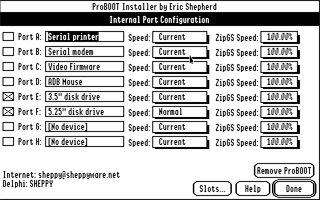
Configuring ProBOOT.
Give each device a name, toggle on and off bootability, specify what system speed to use when booting the slot, including your ZipGS speed, if you have one.
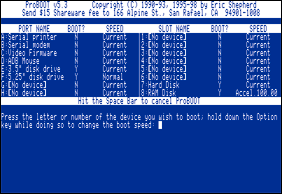
When you hold down the Apple key
on startup, you get this screen.
At startup, you can stick with the default settings, or you can hold down the option key when choosing a drive to boot and change the speed setting before starting up.
There is also a key that lets you pop into Applesoft!
There's also ProBOOT - The Finder Extension, which makes it easy to control reboots right from the comfort of the Finder.
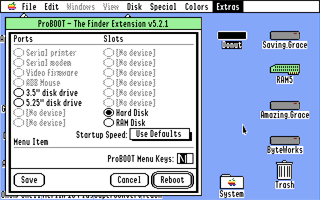
Reboot in style!